

TRON (TRX) is one of the few cryptocurrencies that has weathered the current bull market fairly well. Even as other layer-1 altcoins such as SUI and SOL pulled back sharply, the TRX/USDT trading pair remained relatively bullish. This resilience is one of the main reasons many traders are now looking to swap some of their USDT into TRX.
TRON plays a major role in crypto payments and DeFi and is widely known as the leading network for USDT stablecoin transfers, thanks to its low fees and fast transaction speeds. This has helped TRX maintain consistent demand even during volatile market conditions.
In this guide, we use Bitunix as the trading venue and walk through exactly how to trade TRX against USDT. You’ll learn the difference between market and limit orders and how to place both step by step.
What Is TRX?
TRX is the native currency on the TRON network. It facilitates swap transactions and is used as part of the network’s proof-of-stake consensus model to validate blocks and approve transfers. TRX is also required to pay network fees, stake for resources, and interact with decentralized applications built on TRON.
TRON was created by Justin Sun and has grown into one of the most widely used blockchains in crypto. The network dominates USDT stablecoin transfers thanks to its speed and low transaction costs, making it a preferred choice for payments and settlements. According to DeFiLlama, TRON currently hosts over $4 billion in total value locked, highlighting its strong presence in DeFi.
Thanks to its high-throughput, low-fee architecture, TRON has become one of the most active networks in the industry. Millions of daily transactions flow through the chain, largely driven by stablecoin activity and decentralized applications. This consistent usage provides TRON with real economic demand rather than purely speculative interest.
As a result of TRON’s success, TRX has established itself as a leading cryptocurrency. Its utility-driven demand and central role in the USDT ecosystem have helped it remain more resilient than many layer-1 altcoins during broader market downturns.
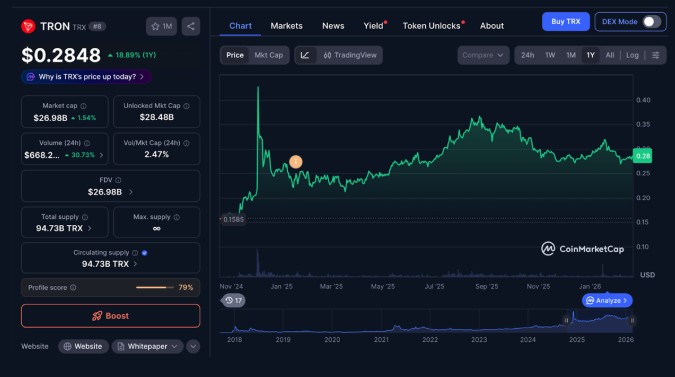
TRX has performed far better than most comparable cryptos during the recent crash. Source: CoinMarketCap
Using Bitunix to Trade TRX
Bitunix offers a secure and reliable platform for trading TRX/USDT. The exchange has an impeccable security track record, live Proof of Reserves, and a Care Fund backed by roughly $30 million USDT. Futures fees start at 0.0200% maker / 0.0600% taker, and TRX can also be staked directly on the platform for passive returns.
Purchasing TRX with a Market Order
A market order is used to buy or sell instantly at the best available price in the order book. Traders typically use market orders when speed matters more than getting a specific entry price, such as during fast-moving price action.
Follow these steps to buy TRX with USDT on Bitunix:
- Deposit USDT into your Bitunix account
Go to Wallet, select Deposit, choose USDT, copy your deposit address, and send USDT from your external wallet. - Navigate to the Spot trading section
Open the Spot trading tab from the main menu to access the spot markets. - Select the TRX/USDT trading pair
Use the search bar to find TRX/USDT, then open the trading page for the pair. - Switch from Sell to Buy
In the order panel, select Buy so you can purchase TRX using USDT. - Choose Market order
Select Market Order to execute the trade instantly at the best available price. - Enter the amount of USDT to spend
Input how much USDT you want to use, or use the percentage buttons to allocate part of your balance. - Confirm the trade and check your balance
Confirm the buy order, then return to Wallet to verify your TRX balance has updated.
Purchasing TRX with a Limit Order
A limit order differs from a market order because it lets you set the exact price you want to pay. The trade will only execute if the market reaches your target price, which is useful for dip-buying or building positions with more control.
Follow these steps to buy TRX with USDT using a limit order on Bitunix:
- Deposit USDT into your Bitunix account
Go to Wallet, select Deposit, choose USDT, copy your deposit address, and send USDT from your external wallet. - Navigate to the Spot trading section
Open the Spot trading tab from the main menu to access the spot markets. - Select the TRX/USDT trading pair
Use the search bar to find TRX/USDT, then open the trading page for the pair. - Switch from Sell to Buy
In the order panel, select Buy so you can purchase TRX using USDT. - Choose Limit order
Select Limit order so you can specify the exact price you want. - Enter your limit price and the amount of TRX to buy
Set your target entry price, then input how much TRX you want, or use the percentage buttons to allocate your USDT. - Confirm the order and monitor execution
Confirm the limit order, then check Open Orders to track whether it fills. Once filled, return to Wallet to verify your TRX balance.
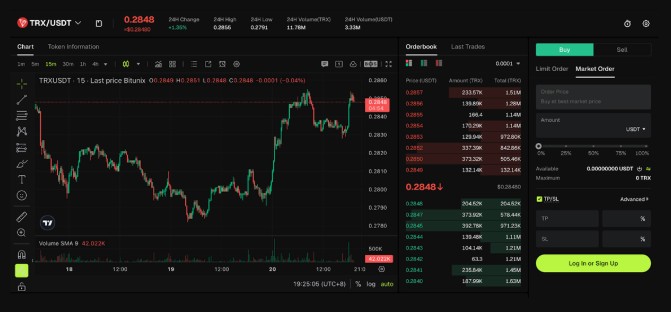
TRX/USDT trading interface on Bitunix. Source: Bitunix
Final Thoughts
TRX has shown serious resilience during the bear market. While many altcoins have plummeted, TRX has maintained a fairly stable price action, largely due to its central role in the stablecoin economy. The steps outlined in this article show traders how to swap USDT for TRX using either a market or limit order on Bitunix. With low fees, strong security, and advanced charting tools, Bitunix provides a straightforward way for both beginners and experienced traders to gain exposure to TRX efficiently.