

Marketing teams and independent creators currently face a specific type of friction: the demand for high-volume video content is rising, but the budget and time required to maintain brand consistency across those assets are not. In the era of algorithmic feeds, a single static image rarely carries the weight it used to. However, generating unique videos for every ad placement, social post, and landing page hero section from scratch is often a recipe for visual incoherence.
This is the batch consistency paradox. To scale, you need automation; but automation, especially in the generative AI space, often introduces “drift”—subtle changes in lighting, character features, or product details that signal a lack of professional polish. The solution being adopted by tool-savvy operators isn’t found in pure text-to-video generation, but in a refined Photo to Video workflow. By using a high-quality static image as the “ground truth,” teams can generate dozens of consistent video variations that feel like part of a single, unified campaign.
The Strategic Shift Toward Image-Centric Workflows
The early days of generative video were dominated by text prompts. While impressive, text-to-video is notoriously difficult to control. If you ask for a “woman drinking coffee in a minimalist kitchen,” the AI might give you a different woman, a different kitchen, and a different coffee mug every time you hit generate. For a brand, this is unusable.
Image to Video AI changes the hierarchy of production. Instead of hoping the AI understands your brand’s aesthetic through a text prompt, you feed it the aesthetic directly via a source image. This image acts as a structural anchor. The AI is no longer responsible for “inventing” the world; it is only responsible for “animating” it. This distinction is critical for teams scaling assets. When you start with a validated brand photograph, the output retains the color grading, the lighting, and the specific geometry of the subject.
Overcoming the “Uncanny Valley” in Batch Production
One of the primary challenges in scaling visual assets is the tendency for AI to hallucinate details during the animation process. In a batch of ten videos, perhaps seven look professional, while three might feature distorted limbs or warping backgrounds.
It is important to reset expectations here: no Image to Video AI tool currently offers a 100% “hit rate” on the first click. Operators must account for a curation phase in their workflow. The goal is not to eliminate human oversight but to shift the human’s role from “creator” to “editor.” By generating batches of video from a single photo, you can quickly discard the hallucinations and keep the assets that maintain the integrity of the original shot. This is still 90% faster than traditional motion graphics or live-site filming.
Implementing a Consistency-First Workflow
To scale effectively, teams are moving away from one-off creations toward a systematic pipeline. This pipeline generally follows a three-step structure:
1. Establishing the Visual Anchor
The process begins with a “Hero Image.” This might be a product shot, a character portrait, or a lifestyle scene generated via an AI image maker or captured by a photographer. This image must be high-resolution and clearly defined. If the source image has muddy details or complex overlapping textures, the subsequent animation will likely struggle.
2. Defining Motion Parameters
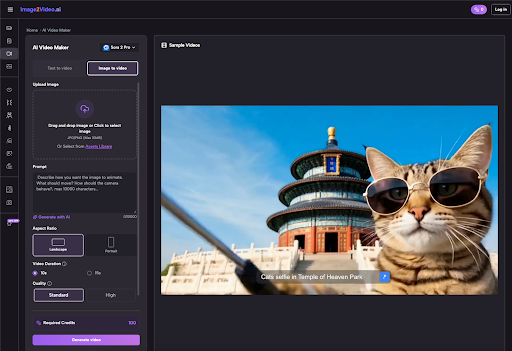
Once the anchor is set, the operator uses a Image to Video tool to apply specific motion prompts. Instead of describing the scene again, the prompt focuses entirely on physics: “subtle wind blowing through hair,” “slow cinematic zoom,” or “steam rising from the cup.” By keeping the prompt focused on movement rather than content, you reduce the risk of the AI overwriting the details of your source photo.
3. Multi-Channel Adaptation
The same source image can be used to generate different aspect ratios and motion styles for different platforms. A 9:16 vertical video with high-energy movement might be destined for TikTok, while a 16:9 version with a slow, professional pan works better for a LinkedIn ad or a website header. Because both stems from the same Photo to Video AI process, the branding remains identical across all touchpoints.
Practical Applications Across the Funnel
Scaling via Photo to Video AI isn’t just about making things look pretty; it’s about practical utility at every stage of the marketing funnel.
Top of Funnel: Social Ads
For platforms like Meta or TikTok, “creative fatigue” is a real issue. Ads stop performing once the audience has seen them too many times. By taking a single successful product photo and generating five different motion variations, a team can refresh their ad sets without a new photoshoot. This extends the ROI of every single static asset in the library.
Middle of Funnel: Landing Pages
Static landing pages are increasingly being replaced by “living” pages. A subtle video background can increase time-on-page metrics significantly. Using a tool to convert a hero photo into a looping cinematic background provides that premium feel without the heavy file size or production cost of a full-scale film production.
Bottom of Funnel: Product Demos
Close-up shots of products—jewelry, electronics, or apparel—benefit immensely from the controlled motion of an AI video generator. A slow rotation or a shifting light reflection can highlight textures that a static image misses, providing the consumer with more “visual data” to make a purchase decision.
Technical Considerations for Scaling
When evaluating an Image to Video AI platform for professional use, there are a few technical levers that matter more than others:
- Seed Control: The ability to use a specific “seed” number allows for some level of reproducibility. If you find a motion style that works, you want to be able to apply that same “math” to other images.
- Aspect Ratio Flexibility: A tool that forces you into a 1:1 square is useless for multi-channel scaling. Professional workflows require 16:9, 9:16, and 4:5 as standard.
- Motion Intensity Sliders: Sometimes you want a dramatic transformation; other times, you just want the clouds to move. Having a “motion bucket” or intensity control is vital for keeping assets within brand guidelines.
Managing the Creative Tech Stack
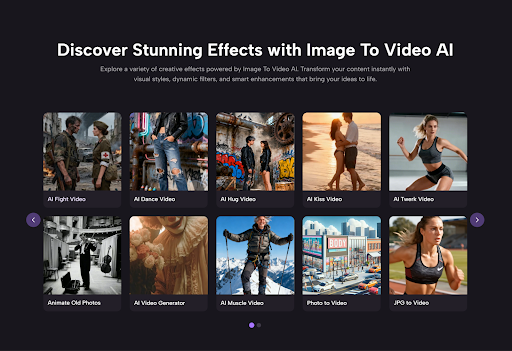
The modern creator’s stack is becoming a hybrid of different AI models. You might use one model for the initial image generation, another for upscaling, and a specialized Photo to Video AI for the final animation. This “chaining” of tools allows for much higher quality than any single all-in-one solution can currently provide.
However, this complexity introduces its own set of problems. Data management becomes a hurdle. When you are generating hundreds of video clips from dozens of source images, keeping track of which prompt produced which result is difficult. Teams that succeed in scaling are those that treat their AI generations like code—versioning their prompts and organizing their outputs systematically.
Addressing the Limitations of Generative Motion
It is worth noting that we are still in the early stages of this technology. While Image to Video AI has come a long way, it still struggles with complex human interactions—like two people hugging or intricate finger movements. If your brand relies on highly specific human gestures, you may find that the AI currently produces too many “uncanny” results to be efficient.
In these cases, the best strategy is to lean into “atmospheric” motion. Animate the environment around the person rather than the person themselves. Animate the lighting, the background, or the clothing textures. This provides the “thumb-stopping” motion of video while avoiding the technical pitfalls where the AI is most likely to fail.
The Future of Batch Asset Production
As models evolve, we can expect to see more “spatial” control—the ability to tell the AI exactly where to move the camera in 3D space relative to your 2D photo. We are also seeing the rise of “image-to-audio” and “video-to-audio,” which will eventually allow for a fully automated multi-sensory asset pipeline.
For now, the competitive advantage lies with the teams that can bridge the gap between static photography and dynamic video. By mastering the art of the Photo to Video transition, brands can escape the trap of expensive, slow-moving production cycles and enter a world of rapid, consistent, and high-quality creative output.
The goal isn’t just to make more content; it’s to make more of the right content, maintaining a cohesive brand voice across every pixel, regardless of the platform. The batch consistency paradox is solvable, but it requires a disciplined, image-first approach to the generative workflow.